
How to Reset a BMW Motorcycle Service Reminder with FXTUL M7

Resetting a BMW motorcycle service reminder is the final record of completed maintenance, not the maintenance itself. The FXTUL M7 motorcycle diagnostic tool can reach the instrument-cluster Service/Maintenance functions on supported motorcycles, read the stored service mileage and date, write the next approved values and then verify what the cluster retained.
Quick answer: Complete and document the required service first, confirm the correct next mileage and date from BMW service information, connect the M7 with the proper motorcycle adapter and stable voltage, identify the exact motorcycle, enter the instrument-cluster Service/Maintenance menu, read the existing values, write only the approved new values, and verify both the scanner result and the motorcycle display before disconnecting.
In this guide
Reset only what the completed service supports
The M7 sends a maintenance record command to a supported control unit. It does not decide whether oil, filters, brake fluid, valve inspection or another scheduled item is due, and it cannot prove those tasks were performed correctly.
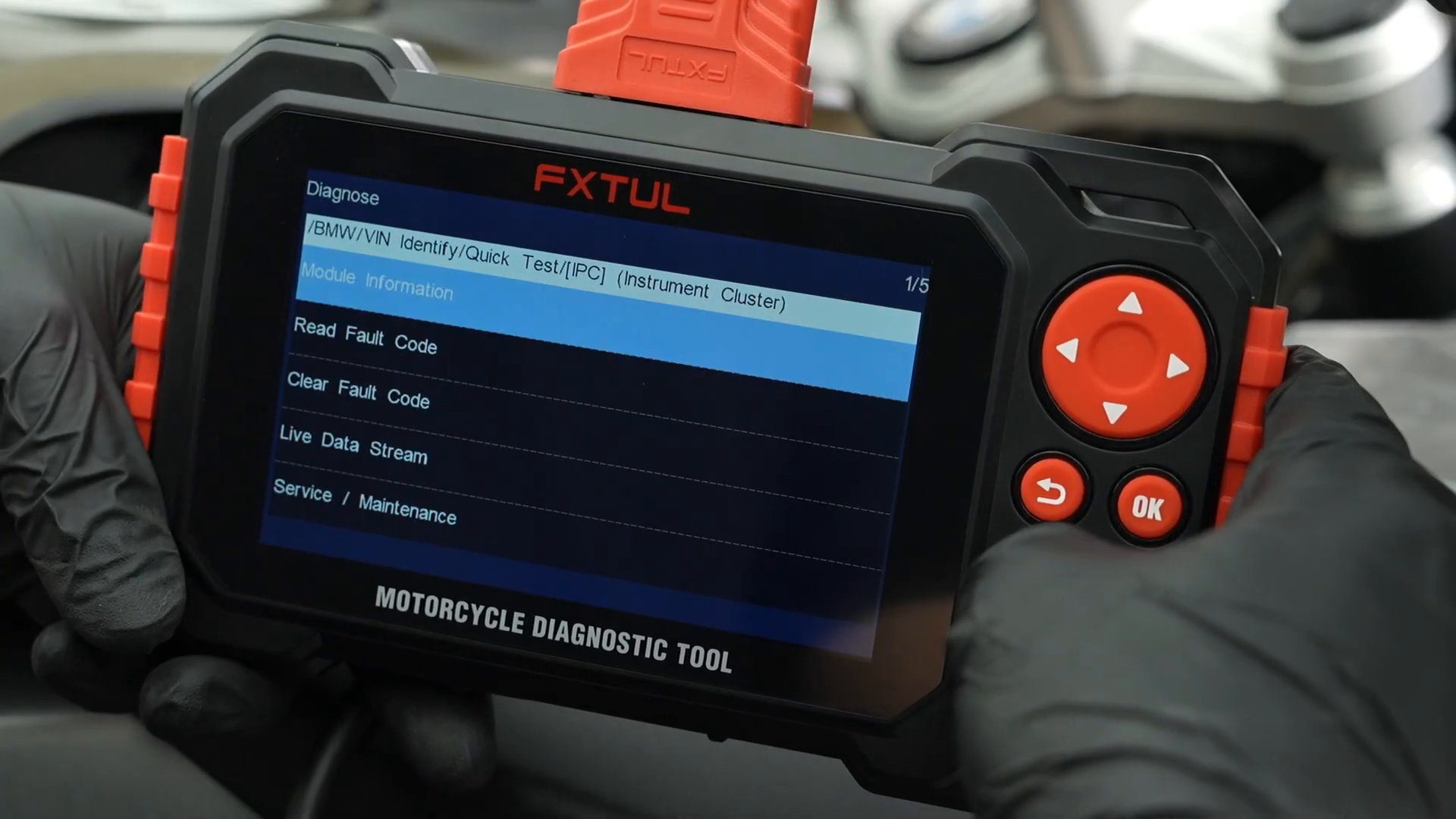
BMW models, years, clusters, diagnostic connectors and software routes vary. The official case shows BMW → vehicle identification → Quick Test → IPC → Service/Maintenance, but the connected motorcycle may use another supported path. Follow the identity and functions displayed for the actual bike.
| Decision | Required evidence | Do not substitute |
|---|---|---|
| Motorcycle identity | VIN/model/year/engine and the connected module | Visual similarity to the video |
| Next service mileage | BMW schedule plus current odometer and completed work | Mileage copied from another motorcycle |
| Next service date | Approved maintenance plan and current date | Video’s displayed example date |
| Reset completion | M7 result plus read-back and cluster check | A disappearing prompt before reconnection |
| Connection path | Correct FXTUL/BMW adapter for the bike | A connector that merely fits physically |
For initial updates, general scanning, fault codes, live data, screenshots and logs, use the complete FXTUL M7 diagnostic guide. This procedure covers only a supported BMW maintenance reset.
Before you start
- Finish the required scheduled maintenance and retain the work order or checklist.
- Confirm the exact BMW motorcycle, current odometer, next service mileage and next service date.
- Update the M7 before the job and confirm the connected model is supported by the installed software.
- Use the correct motorcycle adapter and inspect every pin, cable and connector latch.
- Ensure stable battery voltage and follow BMW instructions for ignition, engine and stand/gear state.
- Record or photograph the existing cluster reminder before changing it.
If you do not know what work was performed or cannot establish the next approved mileage/date, read and record the current values but do not write a reset.
BMW motorcycle service reset with FXTUL M7
Step 1: Complete and document the maintenance
Use the motorcycle’s service schedule and repair information to complete every due operation. Record parts, fluids, inspections, measurements and defects that remain open. A reset without this record can hide overdue work from the rider and next technician.
Calculate the next service mileage and date only after the completed scope is known. Where time- and distance-based schedules differ, preserve both values rather than forcing one interval to represent the entire plan.
Step 2: Stabilize the motorcycle and its battery
Park securely in a ventilated area, control the key and keep the motorcycle from being moved during communication. Use approved battery support if the procedure or battery condition requires it; avoid a charger mode that creates unacceptable voltage ripple.
Turn off unnecessary loads. Do not begin if the battery is weak, terminals are loose or the ignition cannot remain in the required state for the complete read/write cycle.
Step 3: Locate the correct diagnostic connector
Use BMW service information to find the connector and identify the adapter required by the motorcycle. Inspect for corrosion, bent pins, moisture or damage before attaching the M7 cable. A physically similar plug is not proof of correct pinout.
Seat each connection without forcing it and route the cable away from hot exhaust, steering movement and bodywork pinch points. Let the M7 power up normally.
Step 4: Identify the exact BMW motorcycle
Open Diagnosis and select BMW. Use supported VIN identification or make the manual model/year/engine selection from the motorcycle’s verified information. Compare the identified record with the VIN plate and work order before continuing.
If automatic identification returns an implausible model or fails, do not choose the nearest-looking motorcycle. Recheck the adapter, battery state, connector and software coverage.
Step 5: Scan and select the instrument cluster
Run Quick Test when the connected motorcycle exposes its ECUs through the shared diagnostic interface. Save the pre-reset status and note any communication or cluster fault. Where ECUs use independent interfaces, follow the M7 manual’s Control Unit route instead.
Select IPC or the instrument-cluster module shown for the actual bike. Enter its function list and confirm that Service/Maintenance is present. Menu labels may differ after an update.
Step 6: Read the current mileage and date records
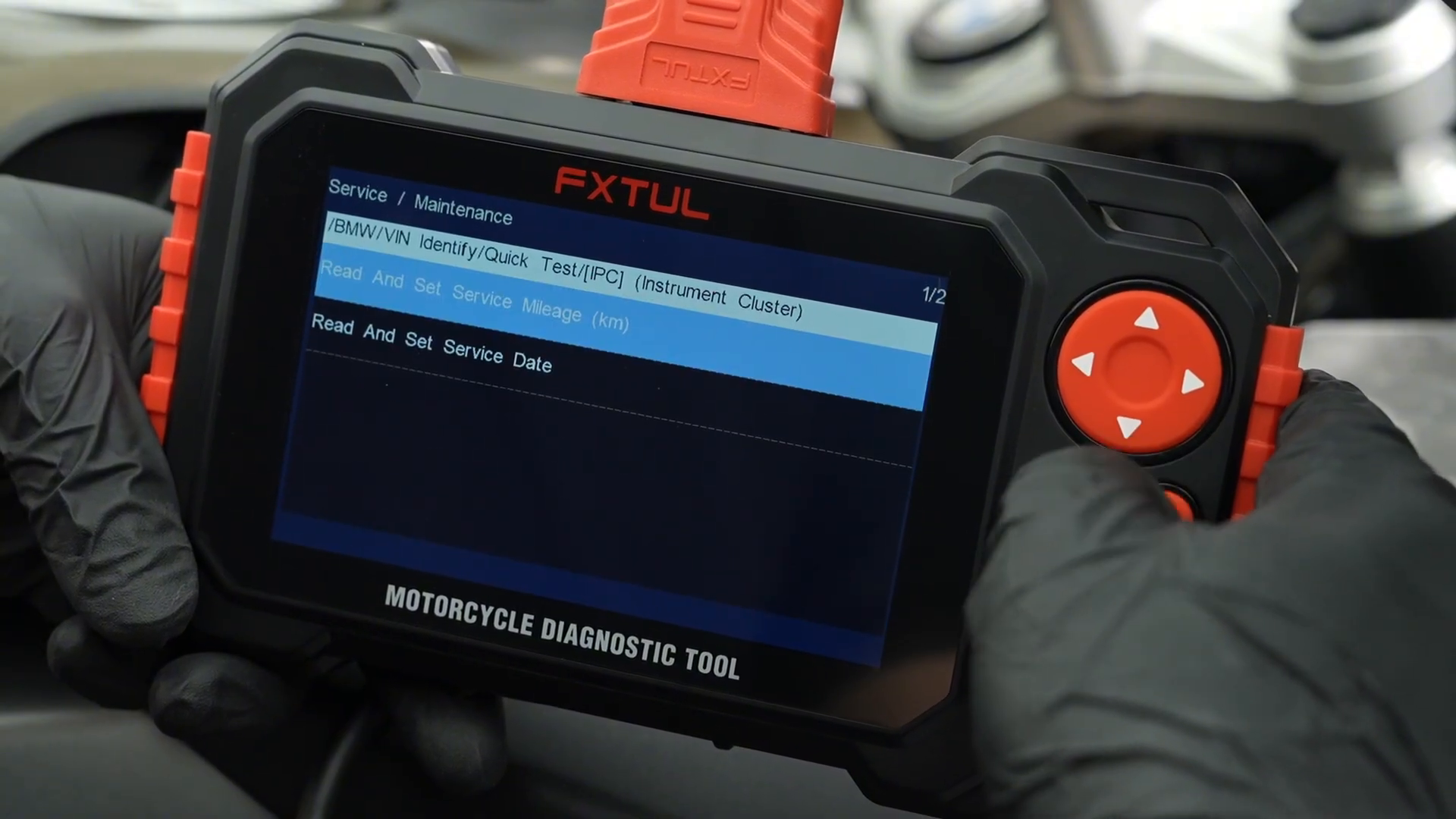
Inside Service/Maintenance, choose the read/set mileage and read/set date functions one at a time. Read before writing. Record the current stored value, M7 units and the motorcycle’s actual odometer/date display.
If the stored value is implausible, do not overwrite it to make the reminder disappear. Confirm unit selection, motorcycle identity and whether the value represents an absolute target or an interval on that cluster.
Step 7: Enter the approved next service mileage
Select the mileage function and enter the value calculated from BMW service information and the completed job. Pay close attention to kilometres versus miles and to any screen that asks for current versus next maintenance mileage.
Review the complete confirmation screen before pressing the indicated Yes/OK key. The number shown in an official demonstration belongs to that case only.
Step 8: Enter the approved next service date
Return to Service/Maintenance and select the date function. Enter the approved next date in the order requested by the M7 screen. Confirm year, month and day individually; date-format assumptions can move an interval by months.
Compare the proposed value with the written service record, then accept the final confirmation only once. Do not repeatedly issue the command if the screen remains on a communication message.
Step 9: Wait for an explicit result and read back
Keep ignition, cable and voltage stable until the M7 displays a definite success or failure state. If communication fails, preserve the message and current vehicle state; do not cycle power until the tool or vehicle procedure permits it.
After a success result, return to the read functions and confirm that both mileage and date were stored exactly as intended. A successful command message without read-back is incomplete evidence.
Step 10: Verify the motorcycle display
Exit diagnosis normally, then perform the ignition cycle specified for the bike. View the service reminder on the instrument display and confirm that the displayed distance/date agrees with the recorded M7 values and the maintenance plan.
Scan the cluster again if required and confirm no new fault or communication issue appeared. If the reminder remains or values disagree, investigate support and cluster logic rather than issuing another arbitrary reset.
Step 11: Save evidence and disconnect cleanly
Use the M7 screenshot or report capability to preserve useful before/after evidence where permitted. Record motorcycle identity, odometer, completed service, original values, new values, result and verification in the job file.
Exit the diagnostic session normally before removing power. Switch ignition off as directed, disconnect at the motorcycle without pulling the cable and refit every connector cap and removed panel.
How to judge the reset result
A defensible reset has three matching records: the maintenance job, the control-unit values and the rider-facing display.
| Evidence | Pass | If it does not match |
|---|---|---|
| M7 command | Explicit success result | Preserve failure and check communication/coverage |
| M7 read-back | New mileage and date match the work order | Recheck units, field meaning and entered values |
| Motorcycle display | Reminder reflects approved next service | Follow BMW cluster verification and rescan |
| Service record | Completed work supports the reset | Correct documentation/service; do not conceal it with another reset |
Do not copy the date, mileage or menu choices shown in a demonstration. Those values belong to one BMW motorcycle and one service plan. Enter only values established for the motorcycle in front of you.
Common mistakes
- Resetting the reminder before the service is completed.
- Selecting a visually similar BMW model after VIN identification fails.
- Confusing kilometres with miles or current mileage with next-service mileage.
- Copying the video’s example date or interval.
- Disconnecting during a communicating or write-result screen.
- Accepting a success message without read-back and cluster verification.
Frequently asked questions
Can FXTUL M7 reset every BMW motorcycle service reminder?
No universal claim is safe. Coverage depends on motorcycle, year, module, connector and installed M7 software; verify the exact bike before service.
What service mileage should I enter?
Use the BMW maintenance schedule, current odometer and work actually completed. Never copy an example value from a video or another motorcycle.
Why do mileage and date appear as separate functions?
The cluster can track distance- and time-based maintenance independently, so both records may require verification and an approved next value.
What if the reset command reports success but the reminder stays?
Read the stored values, perform the specified ignition cycle, confirm cluster identity and scan for faults. Do not repeatedly write arbitrary intervals.
Should I clear fault codes before resetting service?
Read and preserve codes first. Clear only faults whose causes have been addressed and only when the repair procedure calls for it.
BMW reset record
- Scheduled maintenance completed and documented.
- Exact motorcycle and correct adapter verified.
- Stable voltage and required ignition state maintained.
- Original service mileage/date read and recorded.
- Approved next mileage/date entered in correct units and format.
- Explicit result, read-back and cluster display all agree.
- Diagnostic session exited normally and connector restored.
A BMW service reset is reliable when it preserves the truth of the maintenance record. Identify the exact motorcycle, read before writing, use approved next values, and verify the result in both the instrument cluster and the M7 before returning the bike.




Comments 0
Questions, fixes, and real-world diagnostic notes from readers.
Be the first to share a diagnostic result or ask a follow-up question.